Your orders hold steady, but a sudden wave of sessions makes Shopify’s conversion rate fall. That can happen when automated or otherwise unwanted visits enter the report without producing the same share of orders. The lower rate may describe noisier traffic, not weaker demand from real shoppers.
The useful response has two parts: separate likely human sessions from bots in Shopify Analytics, then check whether the unwanted activity repeatedly comes from a country you do not serve. If it does, ShieldLeaf turns that diagnosis into a focused storefront rule instead of leaving you to explain the same spike again tomorrow.
Leafy’s Quick Answer
Yes. Fake traffic can lower your reported Shopify conversion rate when it adds sessions faster than orders. Compare human and bot sessions, then break the pattern down by country and referrer. If recurring unwanted traffic concentrates in an unserved country, preview a ShieldLeaf block or redirect for that country.
Why extra sessions can lower conversion rate
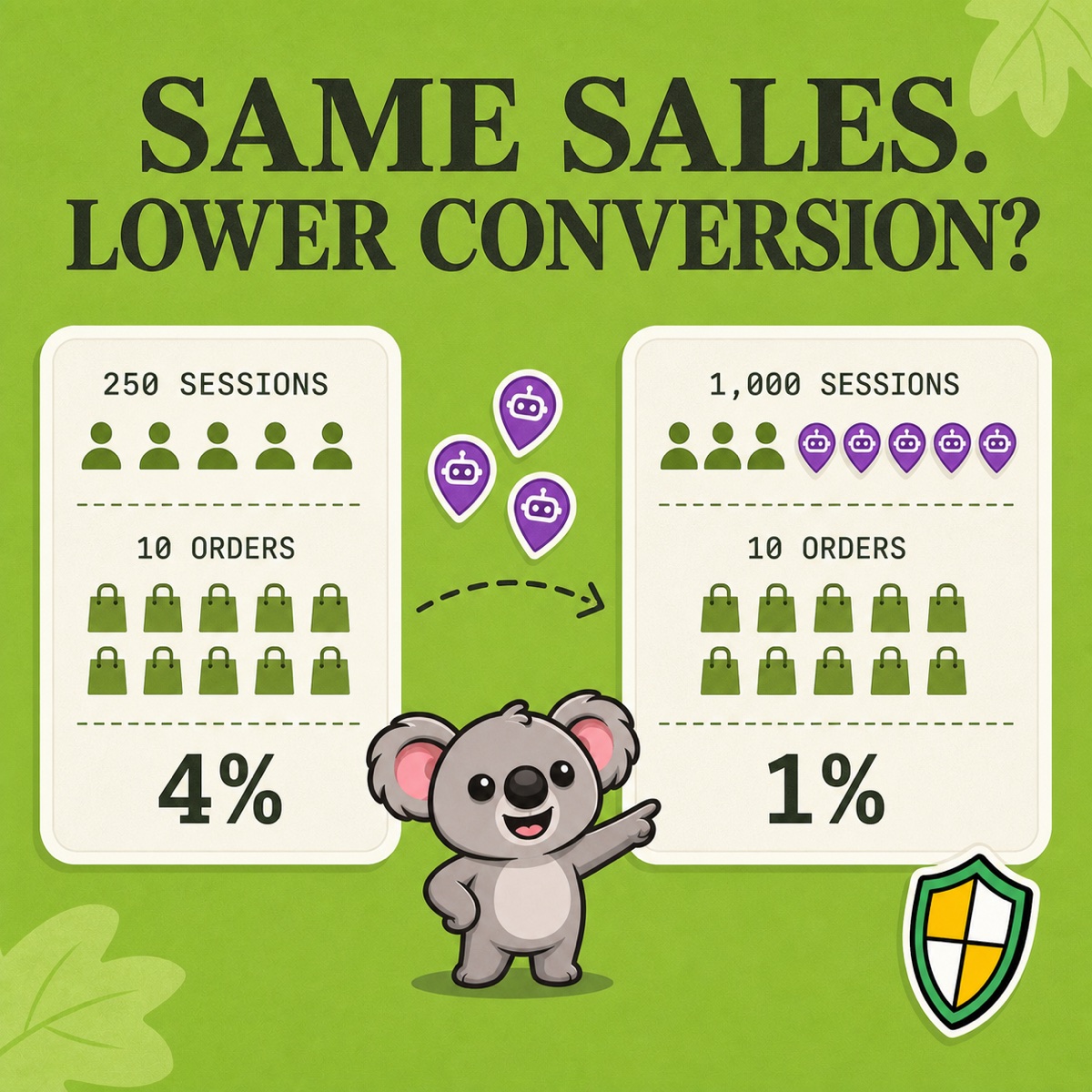
Shopify describes online-store conversion rate in its marketing performance guidance as the percentage of sessions that result in an order. The arithmetic is simple: orders divided by sessions, multiplied by 100.
| Report view | Result |
|---|---|
| Before the traffic spike | 250 sessions + 10 orders = 4% |
| After 750 non-buying sessions arrive | 1,000 sessions + 10 orders = 1% |
Nothing in this example says the original visitors became less interested. The same ten orders are now divided by a much larger session count.
The direction is not automatic. Some automated sessions can trigger conversion events, and a genuine campaign can add many early-stage shoppers who buy later. But when a wave of low-intent or automated sessions produces few orders, the blended rate falls. Shopify’s own bot-filtering example shows how human and bot sessions can carry different conversion rates inside one total.
Check whether people actually converted worse
Do not redesign a product page or cut an ad campaign because the blended rate moved. First compare like with like:
- Open a sessions-related report in Analytics → Reports for the affected dates.
- Add Human or bot session as a dimension, then compare the human, bot, and combined views.
- Add country, referrer, and landing page to find where the extra sessions cluster.
- Compare orders and sales with the previous period, not conversion rate alone.
Shopify’s guide to identifying bot activity also recommends checking legitimate explanations for a spike, including promotions, campaigns, integrations, and performance testing.
If the human-only rate and order volume remain steady, the evidence points to traffic mix rather than a storefront conversion problem. If human performance also falls, continue investigating the offer, campaign, site experience, and seasonality.
Shopify notes that bot classification is conservative, applies only to sessions-related metrics and new data from October 7, 2025, and is unavailable for Headless and Hydrogen storefronts. Treat the label as strong diagnostic help, not proof that every unlabelled session came from a person.
Decide whether you need a cleaner report or less access
Filtering to human sessions gives you a cleaner rate for campaign and product decisions. It does not stop the underlying visits. That difference determines the next move:
- If automation only distorts reporting, save a human-only report view.
- If traffic follows a real campaign or shared link, review targeting before restricting access.
- If repeated unwanted sessions cluster in a country you do not serve, decide whether visitors from that country should reach the storefront at all.
The last case is where ShieldLeaf changes the outcome. Choose the country, show a blocked-access page or redirect visitors, preview the experience privately, and then turn the rule on. Normal setup uses a Shopify app embed without theme-code edits. The Free plan supports one active blocked country; Pro adds unlimited countries, groups and presets, and activity logs for blocked visits.
That creates one memorable workflow: use Shopify to clean the measurement; use ShieldLeaf to control confirmed unwanted country access. A country rule will not rewrite past analytics, and location alone does not prove a visitor is a bot. It gives you practical control when the evidence already shows a recurring regional problem.
Turn a confirmed country pattern into a focused ShieldLeaf rule.