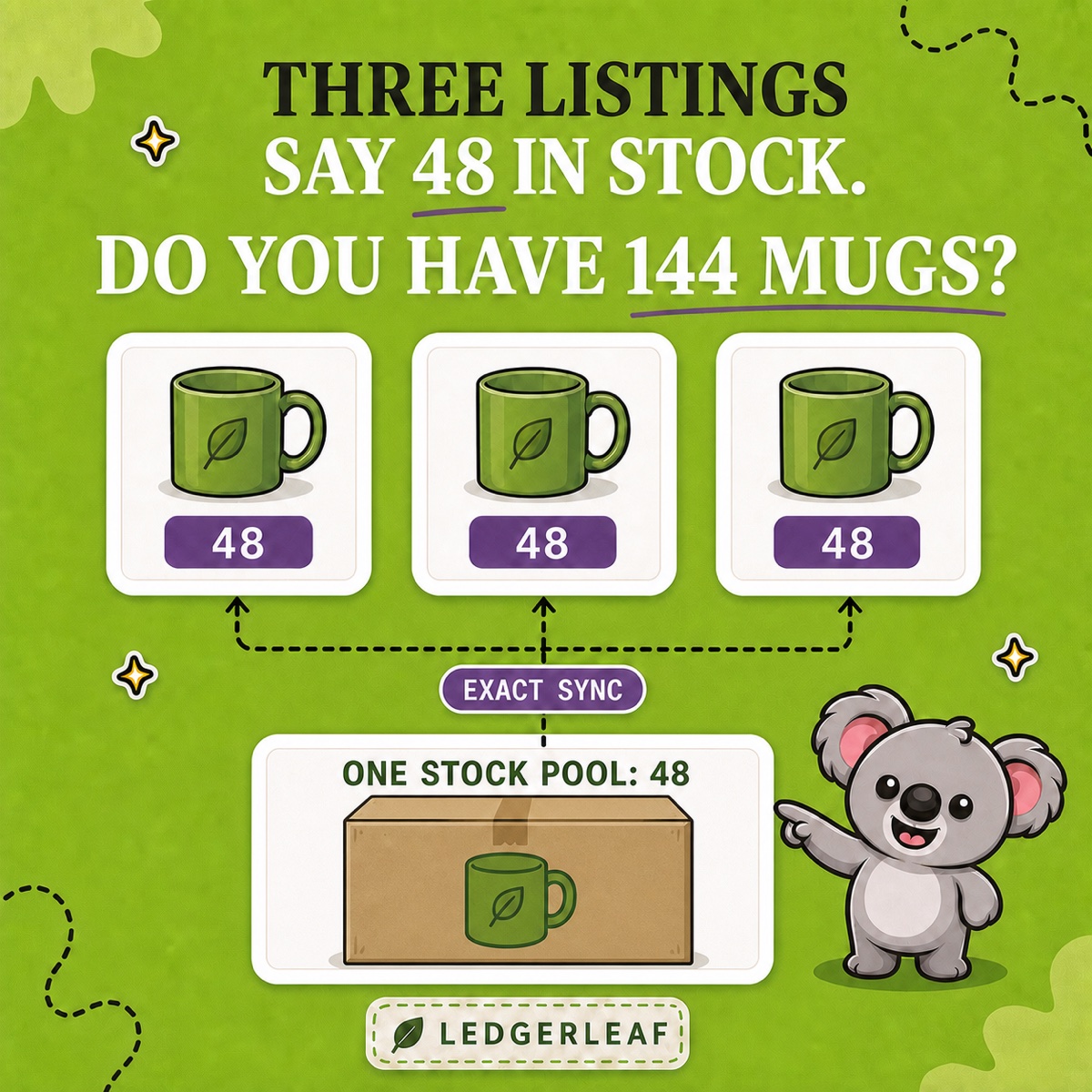
Three Shopify product pages each say 48 in stock. Do you have 144 units—or one box of 48 that can be bought through three different listings?
If all three listings represent the same physical mug, there is only one stock pool. But Shopify still gives every product variant its own stock record. A matching title or repeated SKU does not turn those records into one shared quantity. LedgerLeaf Pro makes the relationship explicit: link the related SKUs, choose exact sync, and let one real stock number stay aligned across the listings.
Leafy’s Quick Answer
Give every listing a clear related SKU, confirm that the products truly draw from the same physical units, then create a LedgerLeaf Pro linked-SKU rule with exact sync. Preview the matched products and test a sale, adjustment, return, and restock before applying the pattern more widely.
First confirm that the products really share stock
Linked inventory is appropriate when different Shopify products or variants are alternative ways to sell the same physical item. You might have separate product pages for different audiences, collections, campaigns, or merchandising angles while fulfilment still picks from one shelf.
Do not link products merely because they look similar. Different sizes, colours, materials, or pack quantities usually need separate stock. A kit containing several items needs a bundle rule instead. Multiple warehouses are another different problem: Shopify tracks inventory independently at each location, so location stock should not be mistaken for multiple listings sharing one pool.
Write down the group before configuring anything:
- Everyday green mug —
MUG-GRN-EVERYDAY— same 48 mugs; - Gift-page green mug —
MUG-GRN-GIFT— same 48 mugs; - Office green mug —
MUG-GRN-OFFICE— same 48 mugs.
If a row points to a different item on the shelf, remove it from the group.
Keep the SKUs related, not duplicated
Shopify’s SKU guidance recommends a unique SKU for each variant and warns that duplicates can create inventory-tracking and integration problems. Repeating MUG-GRN three times is therefore a weak substitute for a stock relationship: it hides which listing produced an order and still does not describe how quantities should move.
Instead, use identifiers that remain distinct while sharing a readable base. The suffixes in the example above identify the listing; MUG-GRN identifies the family. That makes the catalogue understandable to people and gives LedgerLeaf a deliberate pattern to match.
Create the linked-product rule in LedgerLeaf Pro
Open the Stock workspace in LedgerLeaf Pro and create a linked-SKU rule for the shared pattern. Review the products that match before activation—especially if the base appears elsewhere in the catalogue.
LedgerLeaf supports minimum, maximum, and exact sync logic. For several listings selling the same physical units, exact sync is the clear choice because every listing should show the same remaining quantity. With 48 mugs at the start, a sale through the gift listing should leave one physical pool of 47 and bring the related listings back to 47. The three storefront numbers are views of the same stock; they are not quantities to add together.
This is the memorable division of work: SKUs identify the listings; a LedgerLeaf linked-SKU rule carries the shared stock relationship. Without the rule, every new sale or manual adjustment leaves someone responsible for finding and correcting the other records.
Test every way the quantity can change
Start with two or three low-risk listings and a deliberately obvious number such as 48. Then check:
- Reduce one listing manually and confirm the linked quantities align.
- Place a test order through each product page.
- Cancel or return an order using the restock path your team normally follows.
- Add a small restock and confirm every linked listing shows the new total.
- Review Shopify’s stock adjustment history to see which staff member, app, or sales channel made each change.
If you use more than one stock location, repeat the check for every relevant location and confirm the outcome matches your fulfilment setup.
Leafy’s Watch-Out
A broad SKU pattern can connect more products than intended. Preview every match, keep the first rule small, and do not activate it until each listing points to the same physical stock.
One stock pool, without the manual chase
The clean result is not three products that happen to show 48 today. It is one reviewable LedgerLeaf rule that keeps three Shopify stock records tied to the same 48 real units tomorrow, after the next sale, return, adjustment, or delivery.