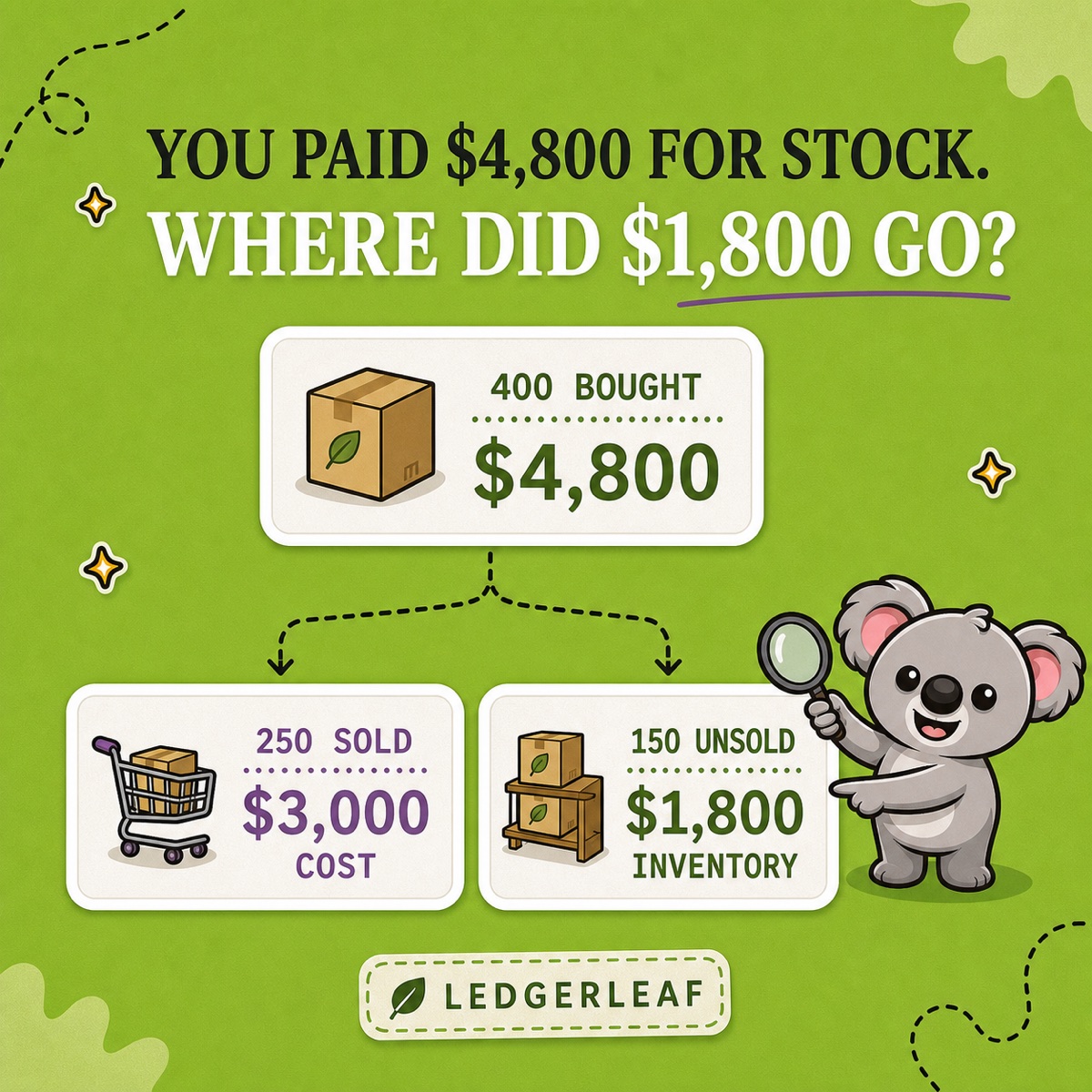
You paid a supplier £4,800 for 400 units. By month-end, 250 units had sold. Shopify shows £3,000 of cost of goods sold, not £4,800.
The missing £1,800 is not necessarily an error. At a constant £12 unit cost, it belongs to the 150 unsold units still held as stock. The purchase brought stock into the business; COGS recognises the cost attached to stock that sold.
Leafy’s Quick Answer
For a simple retailer, COGS follows the units sold during the period, while unsold product cost remains in stock. Shopify’s COGS and profit views include only net sales for products whose cost was recorded at the time of sale. Use LedgerLeaf to preserve the same sales export and stock snapshot each close, then connect those records to the approved cost source and valuation method.
This is general bookkeeping guidance, not accounting or tax advice. Which costs belong in stock, when they become an expense, and which valuation method applies depend on the business and jurisdiction. Confirm the treatment with the professional responsible for your accounts.
Purchases and COGS answer different questions
A supplier invoice answers, “What stock did we buy?” COGS answers, “What cost belongs to the stock sold in this period?” For a straightforward retail example with one constant unit cost:
| Cost movement | Calculation | Amount |
|---|---|---|
| 400 units purchased | 400 × £12 | £4,800 |
| 250 units sold: COGS | 250 × £12 | £3,000 |
| 150 units unsold: closing stock | 150 × £12 | £1,800 |
The £3,000 and £1,800 add back to the £4,800 purchase. Expensing the full supplier bill while 150 units remain would erase the stock asset and overstate the period’s product cost.
The principle is broader than this simplified example. IAS 2 says stock cost is recognised as an expense when the related goods are sold, and it permits specific identification, FIFO, or weighted-average formulas in the circumstances it describes. The correct cost can also include more than a supplier’s unit price. Use the rules applicable to your books rather than treating Shopify’s product field as an accounting-policy decision.
What Shopify can—and cannot—calculate from its data
Shopify’s profit reports use the Cost per item stored on each product or variant. They show net quantity, net sales, cost, gross margin, and gross profit, but only for variants that had a cost recorded when they were sold.
That timing rule creates a useful diagnostic. In Shopify’s Finance Summary, compare Net sales without cost recorded with Net sales with cost recorded. Only the second group enters Shopify’s COGS report and gross-profit calculation. If sales are missing from the cost view, inspect blank or late cost entries before assuming the sales data is wrong.
Shopify also describes Cost per item as static data that is relevant to a particular point in time. When supplier prices change, a current unit cost is not automatically a complete historical cost method. Keep the source and effective date for each approved cost, and let the accounting method determine how changing costs are assigned.
Make LedgerLeaf the spine of the monthly COGS trail
The hard part is rarely the multiplication. It is reproducing the same period boundary, sales population, quantity evidence, and exceptions after Shopify has moved on to today’s data.
LedgerLeaf makes that operating trail repeatable inside Shopify admin:
- Start with the same sales structure. Save a LedgerLeaf Free CSV or Excel export profile and reuse it for every close. A consistent source file makes returns, missing costs, and unusual product lines easier to isolate.
- Preserve the quantity boundary. Keep a LedgerLeaf Pro stock snapshot for the period instead of relying on a live stock screen that will change with the next order or receipt.
- Attach the approved costs. Record the cost source, effective date, and valuation method used by the bookkeeping process. This turns the Shopify quantity evidence into a traceable cost calculation.
- Review the bridge. Explain purchases, units sold, returns, adjustments, and ending stock rather than posting the supplier payment directly to COGS.
- Save the exceptions. Keep short notes for blank costs, negative quantities, damaged stock, transfers, bundles, and linked SKUs so the next close does not rediscover the same issue.
The memorable connection is practical: LedgerLeaf keeps the Shopify evidence around COGS ready to repeat. Its sales exports establish the recurring transaction structure; Pro stock snapshots preserve the quantity trail that cost records need.
Five common errors to catch before handoff
- Treating every purchase as COGS. Unsold stock can still belong in closing stock.
- Leaving variant costs blank at the sale date. Shopify excludes those net sales from its COGS and gross-profit calculation.
- Assuming one current cost solves changing supplier prices. Keep cost history and use the approved valuation method.
- Ignoring returns and stock movements. Shopify treats returns, refunds, and restocking as distinct events; review the sales and quantity evidence together.
- Calling Available stock the final accounting balance. Shopify’s month-end stock value report multiplies Cost per item by ending Available quantity and excludes Incoming and Committed units. Use the LedgerLeaf snapshot as a consistent operational record, then reconcile it to counts, ownership, cutoff, and valuation requirements.
Leafy’s Final Check
Can you reproduce the sales file, the period-end quantity trail, the approved unit costs, and every exception without opening today’s live stock view? If yes, the COGS handoff is ready for professional review.
Build a repeatable Shopify sales-and-stock trail with LedgerLeaf.